GiliSoft Video Converter

GiliSoft Video Converter

trusted
DOWNLOAD 11.42 MB
1  (1 vote)
1.5
This program received 5 awards
Questions & answers
Wiki
Suggest a correction

Video tutorial & screenshots

  • Main Window
  • Adding Effects
  • Video Editor
  • Configuring Output Settings
  • Main Window
  • Setup Wizard
  • Output Settings
  • Main Screen
  • Effects Window

Editorial review

Comments

Ashley Griggs Senior editor

The following review written by one of the Software Informer contributors applies to version 6.8
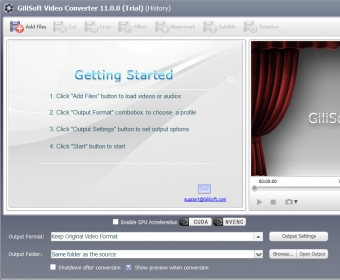
A simple way to get rid of incompatibility errors when attempting to play your favorite videos is to convert the files to a format supported by the video player. Programs like GiliSoft Video Converter helps you convert any video to a large variety of multimedia formats so that you can enjoy watching the videos on your PC, phone or other multimedia device.
The significant advantage brought by this application is that it also offers you some useful video editing tools along with the conversion function. You can cut your films, change their resolution, add effects, watermarks and even include customized subtitles (of any font size, style and color). These built-in utilities work flawlessly and provide you with instant results that can be checked with the integrated video player. Although the conversion tool supports batch processing, this aspect might not prove useful on some occasions, mostly because you can't set individual output profiles when converting more than one file. Another small disadvantage of using this program is that it supports only the SRT and ASS formats for loading the subtitles within videos.

To conclude, my belief is that, even though the application still has some flaws, it brings plenty of output configurations that help you get the high-quality results you need. The processing speed is fast and the price is affordable. So, my advice to you is to give GiliSoft Video Converter a try whenever you're looking for an efficient video conversion tool.

Pros

  • Easy-to-use interface.
  • Supports batch processing.
  • Supports dozens of multimedia formats (input and output).
  • Fast conversion.
  • Brings you various video editing tools.

Cons

  • Unable to set individual output profiles when batch processing.
  • Doesn't support the SUB subtitle format.
This software was checked for viruses last month and was found to be clean. Click here to see antivirus report.
trusted
DOWNLOAD 11.42 MB

What's new in version 8.0

--Fixed some display issue.
--Upgrading registration system.
--Fixed rmvb output problem.
--Fixed swf can not seek when play.
 

Publisher's description

GiliSoft Video Converter is a program that allows you to convert videos and audios among formats like AVI, WMV, MP4, MKV, FLV, 3GP, MPG, SWF. You can also trim your video files to convert your favorite movie clips, add either text or image as watermark to coin and color your video files.

Leave a comment


loading
Download Software Informer Client